
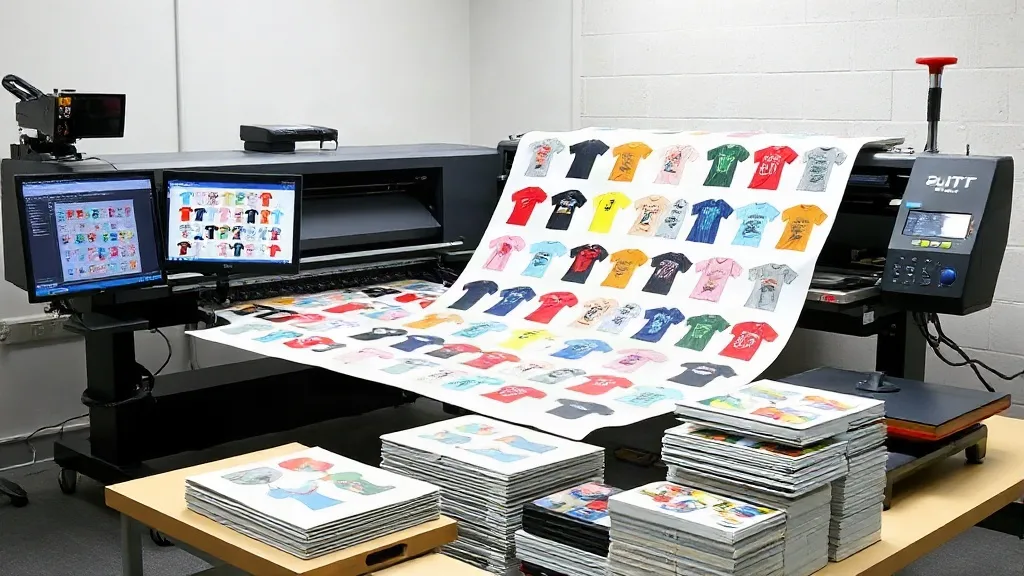
If you run a DTF printing business, you know that efficiency is key to staying profitable. Every wasted inch of film, every minute of downtime, and every misprint eats into your margins. That's where the DTF Gangsheet comes in. By grouping multiple designs onto a single sheet, you can dramatically reduce waste, save time, and lower your production costs. In this guide, we'll explore what gangsheets are, why they're a game-changer for DTF printers, and how to create and order them effectively.
What Is a DTF Gangsheet?
A DTF gangsheet is a single sheet of DTF film that contains multiple designs arranged together, ready to be printed in one pass. Instead of printing each design individually, you "gang" them up on one sheet, hence the name. This approach is similar to gang printing in offset lithography, where multiple jobs are combined to fill a sheet. For DTF, gangsheets are typically created using specialized software or online tools that allow you to import your artwork, arrange it efficiently, and export a print-ready file.
The benefits are immediate: you use less film, less ink, and less powder, and you spend less time loading and unloading sheets. Whether you're a small shop printing custom t-shirts or a large operation fulfilling bulk orders, gangsheets can significantly improve your bottom line.
Why DTF Gangsheets Are a Game-Changer
Let's break down the key advantages of using gangsheets in your DTF workflow.
Reduce Material Waste
DTF film, ink, and adhesive powder are not cheap. When you print individual designs, you often end up with unused space around each design. By grouping designs, you fill that space, maximizing the use of every square inch of film. This can lead to savings of 20-30% or more on consumables, depending on how efficiently you arrange your designs.
Save Time and Increase Throughput
Loading and unloading a DTF printer takes time. If you print one design at a time, you're constantly stopping and starting, which adds up over the course of a day. With gangsheets, you can print multiple designs in one go, reducing the number of print runs and freeing up your time for other tasks. This is especially beneficial for high-volume shops where every minute counts.
Lower Production Costs
Less waste and higher throughput directly translate to lower production costs. You'll spend less on materials and labor per unit, which can increase your profit margin or allow you to offer more competitive pricing. For businesses that outsource DTF printing, ordering gangsheets from a supplier can also be more cost-effective than ordering individual transfers.
Consistent Quality
When you print multiple designs on the same sheet, they all go through the same printing, powdering, and curing process. This ensures consistent quality across all the designs, with no variation in color or finish. That's particularly important for orders that require multiple identical items or a cohesive look.
How to Create a DTF Gangsheet
Creating a gangsheet is straightforward if you follow the right steps. Here's a simple guide to get you started.
1. Gather Your Designs
Start by collecting all the designs you need to print. Make sure they are in a high-resolution format, preferably PNG with a transparent background, and at the correct size for your intended output. If you're using vector files, rasterize them at 300 DPI to ensure crisp prints.
2. Choose the Right Sheet Size
DTF film comes in various widths, commonly 13", 17", and 24". The length of the sheet can be customized, but many printers have a maximum print length (often around 39" or 100 cm). Decide on the sheet size based on your printer's capabilities and the number of designs you want to include. Remember to leave a small margin around the edges for handling.
3. Arrange Designs Efficiently
Use gangsheet software or a design tool like Adobe Illustrator or Photoshop to arrange your designs on the canvas. The goal is to minimize empty space. Rotate designs if necessary, nest them together, and use every available area. Keep in mind that designs should not overlap unless you intend to create a layered effect, and leave a small gap (about 0.1-0.2 inches) between designs to make cutting easier.
4. Add Registration Marks (Optional)
If you're using a cutting machine or plotter to cut out the designs after printing, add registration marks to help align the cutter. These marks are usually small crosses or circles placed at the corners of each design. Your cutting software will use them to detect the design's position.
5. Export and Print
Once your gangsheet is arranged, export it as a high-resolution PNG or PDF file. Load your DTF printer with the appropriate film, ensure the ink and powder are ready, and send the file to print. After printing, apply adhesive powder, cure the sheet, and you're ready to press your designs onto garments.
Tips for Ordering Gangsheets from a Supplier
If you don't have an in-house DTF printer, you can order gangsheets from a supplier. Here's what to keep in mind to get the best results.
Understand Pricing
Suppliers typically charge by the sheet size or by the linear inch. For example, you might pay a flat rate for a 13"x19" sheet or a per-inch rate for custom lengths. Compare prices and ask about bulk discounts. Also, check if there are setup fees or minimum order quantities.
Check File Requirements
Each supplier has specific file requirements. They may ask for a single file with all designs arranged, or they may prefer individual files with instructions. Always follow their guidelines to avoid delays or extra charges. Common requirements include 300 DPI, transparent background, and no overlapping designs.
Turnaround Time and Shipping
Consider the turnaround time and shipping costs. If you need gangsheets quickly, look for suppliers that offer fast production and expedited shipping. Keep in mind that gangsheets are custom-printed, so they may take a few days to produce.
Quality Assurance
Ask about the supplier's quality control process. A good supplier will check for color accuracy, proper powder application, and clean cuts. Read reviews or request samples to ensure the quality meets your standards.
Common Mistakes to Avoid
Even experienced DTF printers can make mistakes with gangsheets. Here are a few pitfalls to watch out for.
- Overcrowding the sheet: While you want to maximize space, leaving no room for cutting can lead to damaged designs. Always leave a small gap between designs.
- Ignoring grain direction: DTF film has a grain direction, and printing designs perpendicular to the grain can affect adhesion and stretch. Always align designs with the grain.
- Forgetting to mirror: If you're printing on transfer film, remember that the design will be pressed face-down onto the garment, so it needs to be mirrored. Most DTF software does this automatically, but double-check.
- Using low-resolution images: Low-res images will look pixelated when printed. Always use high-resolution files (300 DPI or higher).
Frequently Asked Questions
What is the maximum size for a DTF gangsheet?
The maximum size depends on your printer and film width. Common widths are 13", 17", and 24", and the length can vary, but many printers cap at around 39" (100 cm) per sheet. Check your printer's specifications or ask your supplier for their maximum sheet size.
Can I mix different designs on one gangsheet?
Absolutely. That's the whole point of a gangsheet. You can combine any number of designs, as long as they fit on the sheet and meet the resolution requirements. Just ensure they are arranged efficiently to minimize waste.
How do I calculate the cost savings of using gangsheets?
To estimate savings, calculate the amount of film, ink, and powder used per design when printed individually versus on a gangsheet. Then compare the total cost per design. You can also factor in labor time saved. Many printers find savings of 20-30% or more.
Do I need special software to create a gangsheet?
You can use general design software like Adobe Illustrator or free tools like Inkscape, but dedicated gangsheet software (e.g., Gangsheet Builder, DTF Gangsheet Builder) automates the arrangement and ensures proper spacing and nesting. Some suppliers also offer online gangsheet builders.
How should I store gangsheets before use?
Store gangsheets in a cool, dry place away from direct sunlight and moisture. Keep them flat to prevent creasing. If stacked, place a sheet of parchment paper between them to avoid sticking. Use them within a few weeks for best results.
By incorporating DTF gangsheets into your workflow, you'll not only save money but also streamline your production process. Whether you print in-house or order from a supplier, gangsheets are a smart choice for any DTF printer looking to boost efficiency and profitability.