
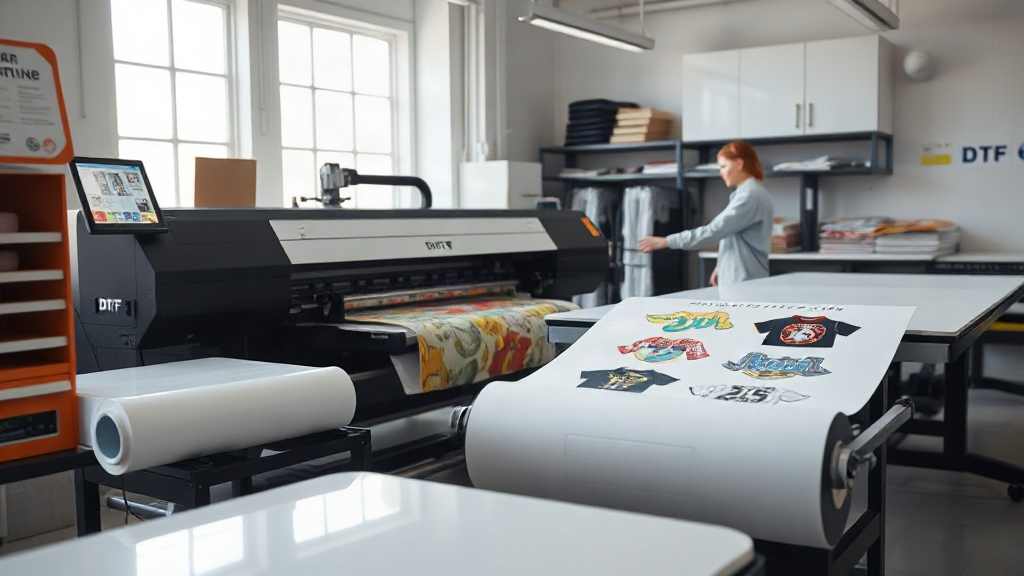
If you're in the custom apparel business, you've likely heard about DTF printing. It's a game-changer for producing vibrant, durable transfers on demand. But what if you could take that efficiency to the next level? Enter the DTF gangsheet – a method that lets you print multiple designs in one go, saving you time, money, and hassle. In this guide, we'll dive deep into DTF gangsheets, from what they are to how you can use them to supercharge your workflow. Whether you're a seasoned pro or just starting out, mastering gangsheets can give you a competitive edge.
What Is a DTF Gangsheet?
A DTF gangsheet is essentially a large sheet containing multiple DTF transfers arranged efficiently to maximize space. Instead of printing each design separately, you combine several designs onto a single sheet, then print and cut them as needed. This approach is similar to gang printing in traditional offset printing, where multiple jobs are combined to reduce waste and setup costs.
The magic of a DTF gangsheet lies in its ability to streamline production. By grouping transfers, you minimize film waste, reduce ink consumption, and cut down on labor time. Plus, you can easily customize the sheet to include various sizes and quantities, making it perfect for fulfilling orders of any scale.
Why Should You Use DTF Gangsheets?
If you're still on the fence about incorporating DTF gangsheets into your production process, consider these compelling benefits:
- Cost Savings: By optimizing the layout, you use less film and ink, which directly reduces your material costs. You also save on labor since you handle multiple designs in one print run.
- Time Efficiency: Printing a gangsheet takes roughly the same time as printing a single design, so you can produce more in less time. This is crucial when you have tight deadlines or bulk orders.
- Consistency: When you print multiple designs on one sheet, you ensure consistent color and quality across all transfers, as they go through the same printing conditions.
- Flexibility: You can mix and match designs, sizes, and quantities on a single sheet, making it easy to accommodate varied customer requests without multiple setups.
- Inventory Management: Instead of stocking pre-printed transfers, you can print gangsheets on demand, reducing inventory overhead and the risk of outdated stock.
These advantages make DTF gangsheets a smart choice for both small shops and large-scale operations.
How to Create a DTF Gangsheet
Creating a gangsheet might seem daunting at first, but with the right approach, it becomes second nature. Here's a step-by-step guide to help you get started:
1. Gather Your Designs
Start by collecting all the designs you need to print. Ensure they are high-resolution and properly prepared for DTF printing. Remember that DTF transfers require mirrored images, so flip your designs horizontally before arranging them.
2. Choose the Right Software
You can use graphic design software like Adobe Photoshop, Illustrator, or dedicated RIP (Raster Image Processor) software that supports gangsheet layouts. Many DTF printers come with their own software that simplifies the process. Look for features like automatic nesting, which arranges designs efficiently to minimize waste.
3. Optimize the Layout
Arrange your designs on the sheet to use space efficiently. Leave a small gap between designs (usually 0.1 to 0.2 inches) to allow for cutting. Consider the dimensions of your film and printer to avoid any overflow. If you're new to this, start with a few designs and gradually increase complexity.
4. Set Print Parameters
Configure your printer settings for DTF printing. This includes ink limits, color profiles, and white ink layering. Since gangsheets often contain diverse designs, ensure your settings accommodate the most demanding design on the sheet. It's a good idea to run a test print to check quality.
5. Print and Cure
Load the DTF film into your printer and print the gangsheet. After printing, apply hot melt adhesive powder evenly over the wet ink, then cure the sheet using a heat press or curing oven. Follow the manufacturer's guidelines for temperature and time to ensure proper adhesion.
6. Cut and Store
Once cured, you can cut the individual transfers apart. Use a cutting machine or scissors for precision. Store the transfers in a cool, dry place away from direct sunlight until ready to apply.
Best Practices for DTF Gangsheet Printing
To get the most out of your gangsheets, keep these best practices in mind:
- Plan Ahead: Group designs with similar ink coverage and colors to optimize printing. This reduces ink switching and ensures consistent quality.
- Use Quality Materials: Invest in high-quality DTF film and powder. Cheaper alternatives may lead to poor adhesion, fading, or cracking.
- Maintain Your Printer: Regular maintenance, such as cleaning printheads and checking ink levels, prevents clogs and ensures smooth production.
- Test First: Always print a small test gangsheet when trying new designs or settings. This helps you catch issues before committing to a full run.
- Keep Records: Document your settings and layouts for future reference. This saves time when reprinting popular designs.
By following these practices, you'll achieve professional results consistently.
Common Mistakes to Avoid with DTF Gangsheets
Even experienced printers can slip up. Here are some pitfalls to watch out for:
- Overcrowding: Packing too many designs without adequate spacing can cause cutting errors and ink bleeding.
- Inconsistent White Ink: White ink is crucial for DTF transfers. Ensure it's applied evenly and cured properly to avoid dull colors.
- Ignoring Film Orientation: Always print on the correct side of the film. Printing on the wrong side will ruin the transfer.
- Skipping Powder: The adhesive powder is what makes the transfer stick. Don't skip it or apply it unevenly.
- Improper Curing: Under-curing leads to wash-off, while over-curing can cause brittleness. Follow the recommended temperature and time precisely.
Avoiding these mistakes will save you time and materials.
How DTF Gangsheets Can Grow Your Business
Incorporating DTF gangsheets into your operations isn't just about saving money; it's a strategic move to scale your business. Here's how:
- Faster Turnaround: Meet tight deadlines and take on more orders without expanding your team.
- Competitive Pricing: Lower production costs allow you to offer competitive prices, attracting more customers.
- Customization at Scale: Easily produce personalized items for events, teams, or promotional campaigns.
- Reduced Waste: Eco-friendly practices appeal to environmentally conscious clients, enhancing your brand image.
- Increased Profit Margins: Efficiency translates to higher profits, giving you room to reinvest in your business.
Many successful apparel businesses have adopted gangsheet printing to stay ahead of the curve. It's a proven method to boost productivity and profitability.
Frequently Asked Questions About DTF Gangsheets
What is the maximum size for a DTF gangsheet?
The maximum size depends on your printer's capabilities. Most DTF printers can handle film widths up to 24 inches (60 cm) or 13 inches (33 cm) for smaller models. The length can be customized, often up to several feet, as long as your software and printer support it. Always check your printer's specifications to determine the limit.
Can I mix different designs on one gangsheet?
Absolutely! Mixing designs is one of the main advantages of gangsheets. You can combine various graphics, sizes, and quantities as long as they fit within the sheet dimensions. Just ensure each design is properly mirrored and spaced for cutting.
How do I calculate the cost savings of using gangsheets?
To estimate savings, compare the material and labor costs of printing individually versus as a gangsheet. Consider film usage, ink consumption, and time spent. Typically, gangsheets reduce film waste by 20-30% and cut labor time significantly. Use a cost calculator or track expenses over a few jobs to see the difference.
What types of fabrics work best with DTF transfers from gangsheets?
DTF transfers adhere well to a wide range of fabrics, including cotton, polyester, blends, and even treated nylon. They work best on fabrics that can withstand heat press temperatures (usually around 300-320°F). For best results, pre-press the garment to remove moisture and wrinkles.
How should I store unused DTF gangsheet transfers?
Store them in a cool, dry place, away from direct sunlight and moisture. Keep them flat or rolled loosely to prevent creasing. Avoid stacking heavy objects on them. Properly stored transfers can last several months without losing quality.
With these insights, you're ready to harness the power of DTF gangsheets and take your apparel business to new heights. Start experimenting with layouts, optimize your workflow, and watch your productivity soar.